---
updatedAt: 2025-09-19T14:39:30.000Z
agentTools:
projectIndex: https://docs.nexiopay.com/llms.txt
---
# Webhooks
***
## tags: \[webhooks]
The simplified webhooks workflow allows you to retrieve real-time information about payment, payout, spendback, and application events.
# Preparation flow
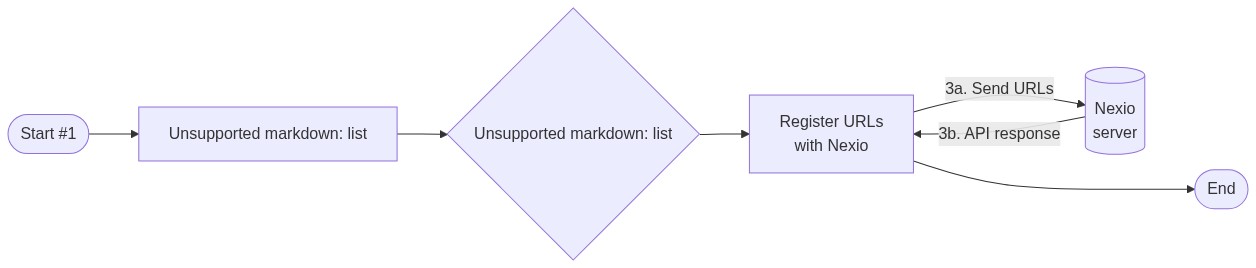
The preparation stage consists of three tasks.
1. Set up one or more URLs on the merchant server to listen for POST requests from Nexio.
You can use a service like [webhook.site](https://webhook.site/) to get a unique, random URL that you can use to test and debug webhooks and HTTP requests.
2. Set up actions to take for potential webhooks. For example, ignoring transaction events from alternative payment methods (APMs) or routing transactions from an authorize-only workflow to a queue for transactions to be captured or identifying payouts that have expired and updating account information accordingly.
3. Register the URL or URLs with the Nexio API. For the steps to take, see [Registering webhooks](https://docs.nexiopay.com/docs/registering-webhooks).
The following flow diagram corresponds to the preparation flow detailed above.
## Preparation flow diagram
[](https://mermaid.live/edit#pako:eNo1kE1rhDAQhv_KkF4UdoVtb1IW_NhDYSlF6aGoh2wyakCTJcZui_rfm6S7t8zM88zLZCFMcSQxaQd1Yz3VBs5FLQHKoCqNK58OTQj7_RES106qQwSZkq3oZo3wWZwnUPL1oo8jautLAxPqb9SNdzLnZMtzBDkywdGBVHJgjw2-wYxQctq8kTojrQrsxGRQ-wQH3YTp4R1_hGockVeBL9zoPzD0_dQvWV9oBCXaIKevuTfuk0sEyccbaJyuNhTX9KHZ6VdQnSRvQrIj9pyRCm5_ZnFATUyPI9Yktk-OLZ0HU5Nabhadr5waPHFhlCZxS4cJd4TORpW_kpHY6BkfUC5op-l4p7Y_jDp76Q)
flowchart LR
S([Start #1]) --> A
A`[1. Configure URLs on
merchant server]` --> C
C`{2. Decide
and configure
actions}` --> B
B`[Register URLs
with Nexio]`
D`[(Nexio
server)]`
B --> |3a. Send URLs|D
D --> |3b. API response|B
B ---> Y([End])
# Event flow
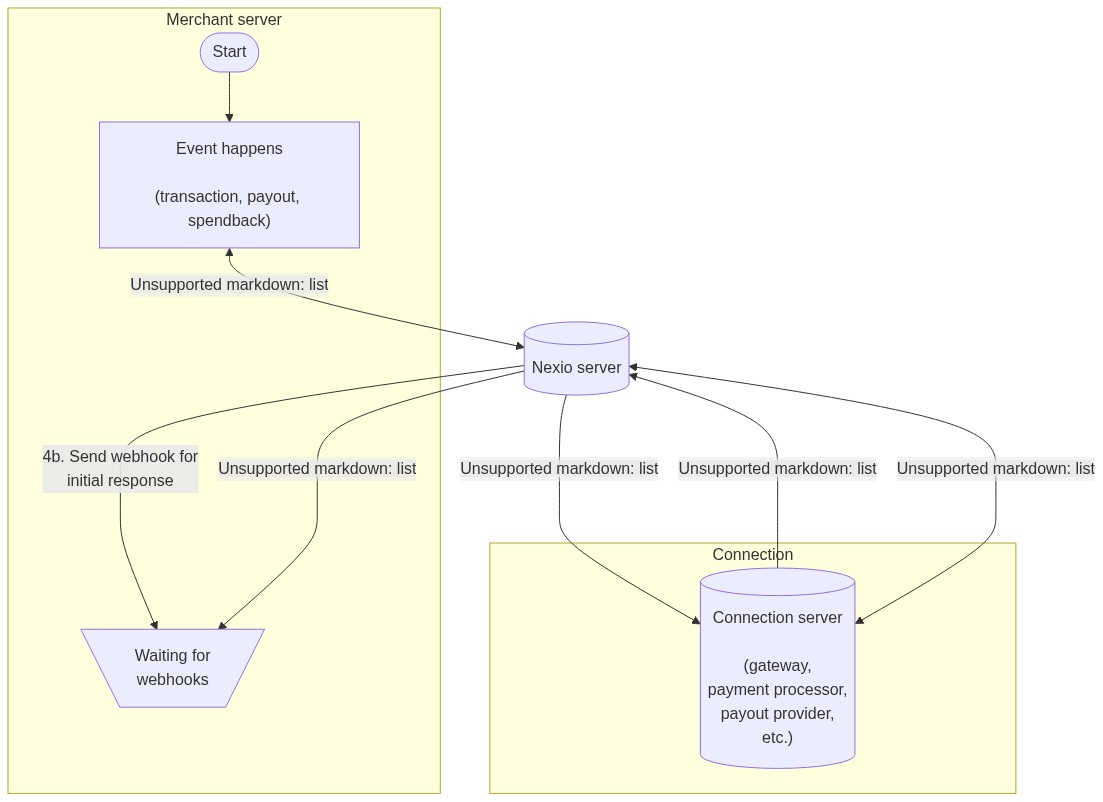
The general flow for an event is the same regardless of the event type.
1. An event happens (the run card or run echeck transaction, the payout request, the spendback request, or the application request) for a specific merchant ID (MID) and the request goes to the Nexio server.
2. Nexio sends the request to the appropriate connection or payment method, based on the settings for the MID.
3. Nexio receives an initial response from the connection.
4. Nexio sends that response to the event and to all configured webhooks for that event.
5. Nexio pings the connection server for status changes to the transaction, payout, spendback, or application.
6. Nexio sends the information about the status change to all configured webhooks for that event.
For the steps to complete the event flow, see [Receiving webhooks](https://docs.nexiopay.com/docs/receiving-webhooks).
The following event flow diagram corresponds to the flow detailed above.
## Event flow diagram
[](https://mermaid.live/edit#pako:eNp1kk9v4jAQxb_KyCeQUqrtvwNCXKCC1aq9UKmHuIdJMhCrxM7aEygq_e4dg9ltq_YQKXl-7_nncV5V6SpSQ7Vcu21Zo2d4mGoLMM179_RiHATyG_L9pyiGrlh5bGsw1UV-R14ClpPjYAD408sXLDVPfTg7G8P8qM5zrW43JOYa25ZsGBV-HJ8ee7QBSzbOZtDiznWcQRBLVWD53Ncq9U5yrR_RsLErWDofs1sqaueew_nBIokviJf5xFlLh-7UMst7Wv1XE_o_mBUybXGXxQ9haSJw611JITh_UoUwihtT0VEjLgcC2v-IMYdRPP7-1wAWIoGnvx0FjvYrHMBvKyfBtcihdTbQ_jhzGVkMXaSQsXLSBiPpfnYyyPpVkQxpAqeBmK-tkxiaHUOXP-06S6jXUsrIXYB4rSsKn6Fuvt8zfIzsJypTDQmzqeSfeo15rbimhrQaymtFS-zWrJW2b2Lt2komflsZdl4Nl7gOlCns2C12tlRD9h2dTFODcq9Ncr29A2TN6zQ)
flowchart TD
D[(Nexio server)]
subgraph id2[Merchant server]
K([Start]) --> H
H["Event happens
(transaction, payout, spendback)"]
C[\Waiting for
webhooks/]
end
subgraph id3[Connection]
G[("Connection server
(gateway,
payment processor,
payout provider,
etc.)")]
end
H `<-->` |1. Send request
4a. Initial response|D
D `--->` |2. Send information|G
D `-->` |4b. Send webhook for
initial response|C
G `-->` |3. Initial response|D
G `<-->` |5. Status changes|D
D `--->` |6. Send webhook for
status change|C
# Receive webhook flow
The merchant server receives webhooks from Nexio at the registered URLs.
When a transaction, payout, or spendback event happens, it automatically triggers a webhook, whether it was successful or failed. However, this webhook has no additional information or meaning than the initial response to the request.
For example, an initial `transactionStatus` may be 10 (or 12 for echecks), indicating that the transaction has been successfully authorized and is pending settlement. Usually, the status changes almost immediately to 20, indicating that the transaction settled successfully.
So, look for the next webhook about that transaction to know when the status changes. For example, when the status changes to 20. In the case of a status change from 10 or 12 to 20, you may want to ignore the webhook. However, if the status is not 20, then you may want to initiate an action. For example, if there is an error or the status changes to voided. Or, for the case where you do an authorize-only transaction and then capture later, the status changes as those events happen (from `authOnlyPending` to `authOnly`).
For payouts, the `transferStatus` or `payoutStatus` may change. Typically, you will only be looking for a `payoutStatus` change, however. You may not need to do anything for a status change to 12 (pending recipient action) or 20 (completed). But may want to do something if the status changes to 11 (pending merchant action). Or, if the payout expires and returns a status of 30, you want want to update your own records and account balance.
For spendbacks, the `spendbackStatus` may change and has similar changes as for payout events, including spendbacks that need to be reviewed, that were canceled, or that have expired.
For onboarding applications, the `credsReady` status may change, pending items may be updated or notes made about the application, application information may change, or the application status may change. Use the `repCode` to identify the account to use and the `onboardingId` to use the [View application by onboarding ID](https://docs.nexiopay.com/reference/viewapplicationonboardingid) endpoint to get more information about the application.
The following receive webhook flow diagram corresponds to the information detailed above.
## Receive webhook flow diagram
[](https://mermaid.live/edit#pako:eNpVUV1rwjAU_SuXPCnoxnwsQxi2gsL24kAw6UNsbtuwNpHkVjfU_740a2G-ndzzCbmywipkCSsbeylq6Qg-U2EA3iZ8R-GZT2E-X0K8pXzygd_agkd3RjfN-6PvjpWTpxq0WvB3dCHE0KCIAoAVF2IvNWlTQWnd69EtL3isrf3yz1GCRsX8WHV7eYJduMCg6eXSg0N_ssbjmKBNCJQN4BkN3UL5v4TFY8Jo8SSp89AvrHC0ZNcUC-21NfdoXvNV8IQesrGmMtZhXLl5ZGRBeXRsY0yEmx5ueWohsCEy-raROvRwHeCIV39b98NGhwXqM6pb1pOHCc-Myqdsxlp0rdQq_NG1ZwSjGlsULAlQYSm7hgQT5h6k3UlJwkxpso4lpWw8zpjsyO5-TMESch2OolTL8G3toLr_AicOq6U)
flowchart TD
A([Start]) --> D
D[(Nexio server)]
subgraph id2[Merchant server]
C[\Waiting for
webhooks/]
end
D --> |1. Send webhook
as response for
initial event|id2
D --> |2. Send webhook for
status change|id2
E`{Decision}` --> F[Choose to
ignore]
I[Choose to
act] --> J
E --> I
J[Do action]
J --> Z
F ---> Z
C --> |Webhook received|E
Z([End])
# Overall flow
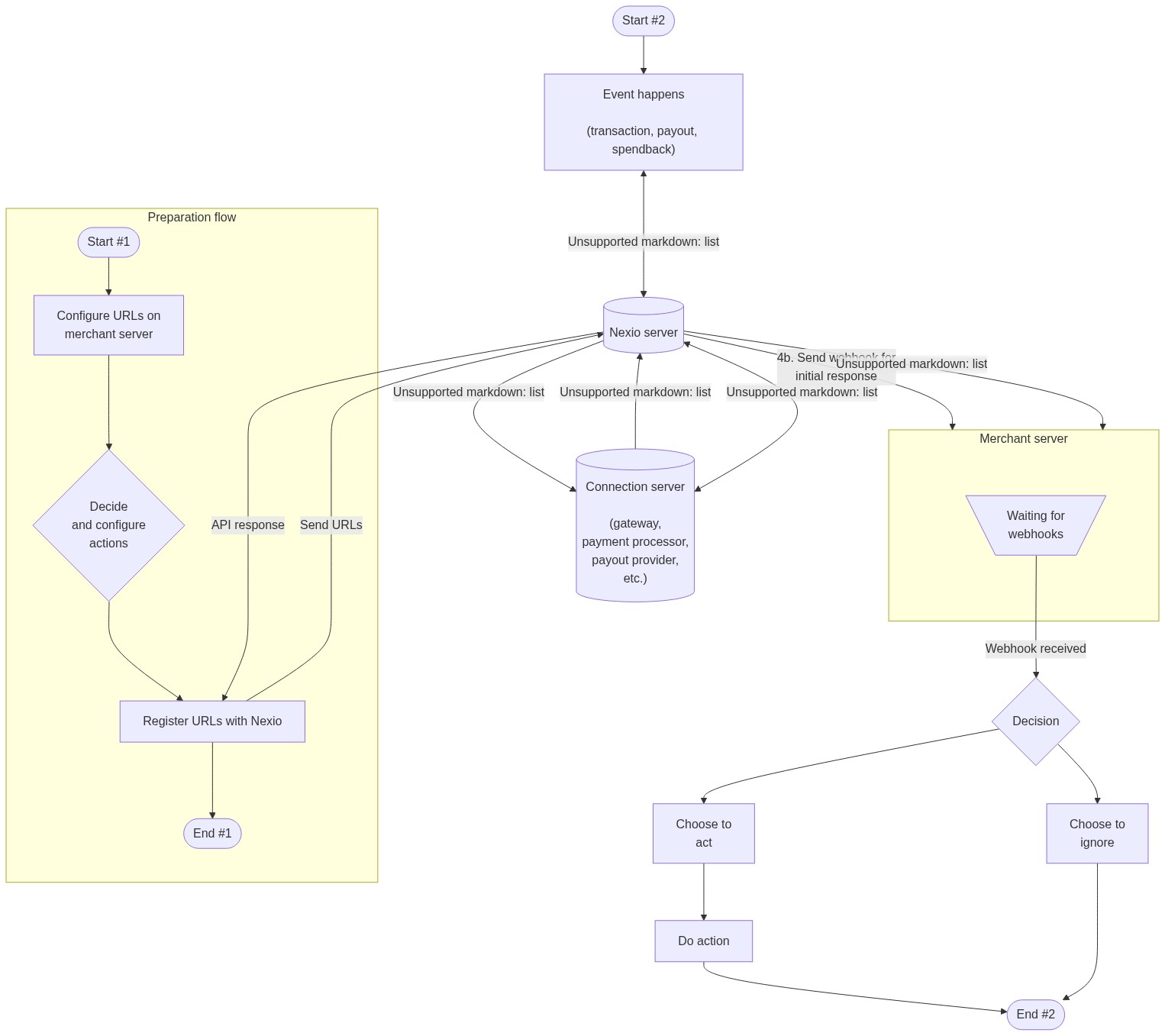
The following diagram indicates the combined flow for simplified webhooks. The numbered actions correspond to the event flow:
[](https://mermaid.live/edit#pako:eNp1U99v2jAQ_ldO3gtIlAnW7QFVlfhVCt2mCjZ1bZIHkxzBKtiZ7cBQ4X_f2Q6Moe0hyvnuvrv7Pp_fWKoyZB22WKltuuTawrdBLAF-1KKZdcd37aQOV1e3cO_cppznmhdLEFkretRYcM2tUBIcPnEZALMTtFVBuyHQjfpKLkReaoTv088GlLyZ69s1auosLRjUG9SJhzwEyMPbAFORocvjMoP0WMA7UtfaHDygFwC9aIq5MBZ1aLEVdglf8ZdQ1XQ9n_0cDs-1aEhV3aDOgTJzv0FU84hqoHpywbwdfbkYOVTrR3H8xIUVMoeF0m7ELc6XSr2a98lZ_VFUixlJIdETqIq4dPfVcm5xy3cNdyj4bo3Up9AqRWOUPnpV6Z0b0ib40KbNeszCsIHkfkYNvQx7f6cD8jp393EMGk1B2uG-d4xQ4HreBI-pxj6yEJJI8dUfEGlwBvv0b5Sx3JYGnFD5CXIfxWy4cZSWvChQmhNtq7k04UobEBg2wFBKNufpK1FLzlq2q5ZCUrO1X8H9yNeHm0Cy1YQp_izRWFf9mjdhfMnCizL0G2aoQNiju6hPJAyCVZ56LpVG33r8d4RGDas68WW8OXbmJBooCEQ8buJDL868Czfg7X5g8lSJpjFFscFsP_QrEoIf_jf1yNGkhI-kw7nM1U2_VHtNb5c1GD2wNRcZvfI3F4yZXeIaY9YhM8MFL1c2ZrE8UGpZZLR9w0xYpVlnwVcGG4yXVs12MmUdq0s8Jg0EpwexrrIOvwE952cO)
flowchart TD
X([Start #2]) --> H
subgraph id1[Preparation flow]
S([Start #1]) --> A
A`[Configure URLs on
merchant server]` --> K
K`{Decide
and configure
actions}` --> B
B`[Register URLs with Nexio]`
B --> Y
Y([End #1])
end
D[(Nexio server)]
subgraph id2[Merchant server]
C[\Waiting for
webhooks/]
end
G[("Connection server
(gateway,
payment processor,
payout provider,
etc.)")]
B --> |Send URLs|D
D ---> |API response|B
D --> |4b. Send webhook for
initial response|id2
D --> |6. Send webhook for
status change|id2
H["Event happens
(transaction, payout, spendback)"]
D --> |2. Send information|G
H `<--->` |1. Request
4a. Initial response|D
E`{Decision}` --> F[Choose to
ignore]
I[Choose to
act] --> J
E --> I
J[Do action]
J --> Z
F ---> Z
C --> |Webhook received|E
G --> |3. Initial response|D
G `<-->` |5. Status changes|D
Z([End #2])
# Next steps
* [Registering webhooks](https://docs.nexiopay.com/docs/registering-webhooks)
* [Receiving webhooks](https://docs.nexiopay.com/docs/receiving-webhooks)